Just a quick check.. anyone here have any invites they could forward on?
OMG iPad
I just thought I would say that we now have an iPad. And that we are enjoying it. We will do a review later.
A few things about the iPad now that we have been using it for a while.
1) typing large amounts of text is not that easy when you do not have the feedback of a keyboard. I did not think that i would miss the feedback of real keys as ouch as do.
2) the platform does get out of the way when you are doing something. essentially, it becomes all about the application.
3) pinch to zoom is nice and it makes me sad that apple patened the tech; then again, it does keep people tied to apple products.
4) for someone using the iPad as a computer replacement is going to have a hard time unless there are apps that fulfill their specific needs. I will not be doing work from home with it any time soon.
Ski trip
Hi – thought I’d post my ski pictures here for all to enjoy.
We had a fabulous time. Kevin spent most of his time standing around saying encouraging things, which is why all the pictures are of me. When I stood around, I huddled inside while Kevin did one of his black diamond runs. Which would have been too fast for me to take a picture of anyway.
First Impressions – Mac and Windows Home Server
The Mac:
In a recent discussion on what Linux needed to be a contender on the desktop the ‘Magic’ and polish of the Mac. Most everything has a single place to get things done – that’s the biggest difference so far. There is, however, consistency about where that single place is across applications. For a given operation that you will do with any application – say, resizing the window – you learn it once and your done.
Networking with Windows machines is a bit of a pain thus far; I miss being able to specify a single IP-address based path as where something exists. It’s probably one of those ‘bad’ things that Microsoft does that the Mac doesn’t for some good reason. Stil miss it though.
Windows Home Server
Liking it thus far. There are a few things I wish it could do, but they mostly relate to things that I believe are HP-based additions. I wish I could figure out how to assign it an IP address instead of leaving it to the random nature of DHCP – but doing a manual address breaks something when it comes to talking with the MAC. I’m missing a setting somewhere and I don’t know what it is.
Still, being able to toss a few hard drive at the thing and it Just Works… I like this. Especially that I didn’t need to turn the machine off to add those hard drives.
Right now we have moved all our files over to this system. Add together the drive the system came with, the extra drive I bought for the now dead system, and the ‘large’ drive I pulled out of the dead system… we now have 2.9 TB of space, with 2.1 TB available. Overkill at the moment for sure, but I’m ok with that.
Aftermath of a Computer Crash
A few weeks ago our main PC died. Well, mostly died. There is a virus on there that no virus scanner I’ve tried can catch. (I suspect Aleah’s new found ability to click on all things shiny led to clicking on Something Bad). Then came the computer crashes that would happen even when trying to re-install the OS on a brand new hard drive. (RAM problem is my only real thought).
So we started talking about things we wanted to do with the computer. We’ve wanted to get it out of that room to make it more “Donavan’s Room”. We’ve also wanted to move the PC into either the living room or into our bedroom – both of which make us want a much smaller computer. Add to this a general (and growing) curiousity about The Other Side…
We got a Mac.
A Mac Mini, to be exact. We get to keep our existing monitor/keyboard/mouse/etc and we get a computer that is roughly the size of a tissue box. (6 1/2 inches wide, 6 1/2 inches long, and 2 inches tall. TINY)
There’s a problem with this though: No Adding Hard Drives. The base model Mac Mini comes with a 160 gig hard drive. To upgrade to a 320 gig hard drive would cost… the same as buying a 1 Terabyte hard drive at regular retail prices. !?!?!?
So there’s another thing we’ve been talking about doing: getting a computer that we could use to store all our files to access them from the laptop, the desktop, the whatever. Enter in the HP Media Server – which should arrive in the mail today. (go go Amazon Prime Next Day Shipping!)
When it gets here I’m going to load it up with all our media files and create personal space for everyone to store their ‘stuff’. And remember what I said earlier, that I couldn’t even re-install Windows to a new drive? Yeah, that new 1 Terabyte drive is going in the media server right way too. I’ll probably even wipe clean the extra drive that is in the PC and add it in. I expect we’ll have just short of 2 Terabytes of space on the thing to start with.
So that’s the hardware side of what we had happen when the computer died. One new Mac in the house and a home server too.
Now we get to enjoy the software side of things. (such as saying good-bye to all our stored e-mails, and learning an all-new OS)
Sub Title
I like the new description of The Family ” Hard to get in, but you are in for life if you do.” Makes me almost laugh.
Christmas
This Christmas was wonderful, particularly my real Christmas, Saturday, when I spent the day with Chris’s family.
I did have one problem, though… not a big problem, but one I though I would bring up. Was anyone else a little bummed out by just shopping for one? Or was it better for you to be able to concentrate your efforts on one?
I would like to try buying for all, just getting smaller gifts. We don’t have to decide now, of course. I just wanted to bring the topic up for discussion while this Christmas is fresh in our minds. I am still happy either way. There are always birthdays if one wants to get a gift for all.
I did have the thought that I, or we, as parents could take ourselves out of the drawing and buy for all our kids, but that would leave the rest with such a limited number to draw and… it just doesn’t feel right. Maybe if i had 10 kids… but then i might want to be in the drawing. 🙂
I also thought that we could give as couples to individuals… cutting each family’s gift giving down to 4.
As for how much we spend…. I was thinking. If one’s budget is $10 -$20 and another’s is $50 – $60, as long as the gift is selected with thought, what difference does it make? If it does make a difference to most (equality) I am willing to stipulate a price range, of course.
Your thoughts?
Snap Press
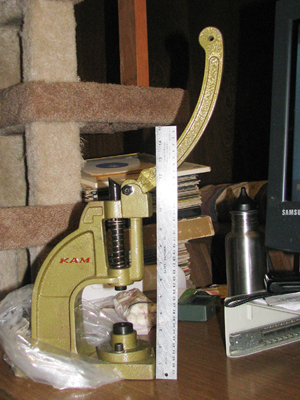
This is the new snap press I bought for putting on plastic snaps. It is about twice the size I expected – that’s a 15 inch ruler beside it. With this thing those snaps don’t have a chance!
Computer security
Being brief here – Ramona and I had a quick talk about keeping files on a laptop secure even if you lost the laptop. One good solution that I know of is a software package called True Crypt.
True Crypt allows you to create an encrypted file on the computer that TrueCrypt will mount as a regular drive. You store your important files inside the True Crypt drive and they are encrypted/decrypted on the fly.
Using this solution will keep your files secure so long as you log off of your account when you put the laptop away. And that’s what you should be doing when you travel anyway.
So, if someone did snatch the computer and try to pull files off the hard drive… well, the chances of them being able to break TrueCrypt depend on how good of a password you used.
Anyway, I use TrueCrypt to store some important work files that get backed up to a third party (Mozy). Not that I don’t have some trust in Mozy, I just want to be very sure about the security of the files when they get transferred somewhere else.
Christmas in general
Well, I guess it’s time to go ahead and bring this up.
Kevin is still unemployed. And I figure we all have financial pressures, and besides that, we’re all grown up and don’t need anything. Well, nothing small, anyway.
So – what would the group like to do?